Installing the right best iPad productivity apps can turn your sleek tablet from a passive Netflix screen into a genuine laptop replacement overnight.
- Apple Pencil Powerhouses: Apps like Goodnotes and LiquidText unlock tactile note-taking and deep research capabilities that traditional laptops simply cannot match.
- Subscription-Free Gems: Tools such as Things 3 ($19.99 one-time) and Noteful ($6.99 lifetime) prove you do not need endless monthly fees to stay organized.
- Local-First & AI Speed: Obsidian keeps your markdown notes offline forever, while Notion and Drafts supercharge cross-platform workflows.
- Desktop-Class File Handling: PDF Expert and Apple Shortcuts bridge the gap between mobile convenience and pro-level automation.
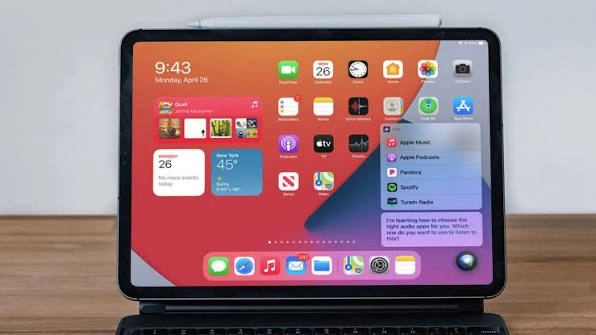
Why do most professionals still carry a heavy laptop alongside a powerful iPad Pro?
The answer usually comes down to software friction rather than raw silicon limits. Modern iPads pack desktop-grade M-series processors, yet default apps often bottleneck complex daily workflows. Selecting purpose-built iPadOS software removes those artificial walls through Stage Manager support, low-latency stylus engines, and instant keyboard shortcuts.
Top 10 Best iPad Productivity Apps Compared
Before diving into individual workflows, look at how the top ten iPadOS contenders stack up across pricing models and primary use cases. Many developers have shifted toward tiered subscriptions, though several standout apps still respect one-time purchases.
| App Name | Primary Category | Standout iPadOS Feature | Pricing Model (USD / INR / EUR / GBP) |
|---|---|---|---|
| Things 3 | Task Management | 200ms launch speed & system-wide Quick Find | $19.99 one-time (approx. ₹1,680 / €18.50 / £15.80) |
| Goodnotes | Handwritten Notes | Ultra-low latency Apple Pencil ink & Math AI | Free; Essential at $11.99/yr (approx. ₹1,010 / €11.10 / £9.50) |
| Notion | All-in-One Workspace | Relational databases & integrated AI Agent | Free; Plus at $10/mo annual (approx. ₹840 / €9.25 / £7.90) |
| Obsidian | Knowledge Base | Local-first Markdown files & interactive graph view | Free core; Sync at $4/mo annual (approx. ₹335 / €3.70 / £3.15) |
| LiquidText | Research & PDFs | Pinch-to-collapse documents & live excerpt linking | Free; Pro 2023 at $89.99 once (approx. ₹7,560 / €83.20 / £71.10) |
| Todoist | Cross-Platform Tasks | Natural-language Quick Add & Split View drag-and-drop | Free; Pro at $5/mo annual (approx. ₹420 / €4.60 / £3.95) |
| Fantastical | Calendar & Scheduling | Natural-language event parsing & interactive widgets | Free; Individual at $56.99/yr (approx. ₹4,790 / €52.70 / £45.00) |
| Drafts | Rapid Text Capture | Instant blank-page launch & custom routing actions | Free; Pro at $24.99/yr (approx. ₹2,100 / €23.10 / £19.75) |
| PDF Expert | Document Editing | Desktop-grade OCR, text editing, and form signing | Free; Annual plan at $79.99/yr (approx. ₹6,720 / €74.00 / £63.20) |
| Noteful | Lightweight Notes | Layer-based PDF markup without subscription bloat | Free; Pro Lifetime at $6.99 (approx. ₹585 / €6.45 / £5.50) |
Handwriting and Deep Research Powerhouses
Touch-first computing shines brightest when you pair an Apple Pencil with software built specifically for spatial thinking. Unlike rigid word processors, these tools treat your display like an infinite studio desk.
1. Goodnotes: The Digital Paper Standard
Goodnotes remains the gold standard for students, architects, and executives who think best with a stylus in hand. Its vector ink engine renders strokes with near-zero perceptual lag, while built-in OCR makes messy handwriting instantly searchable. You can start for free with up to 3 notebooks, or unlock unlimited storage and audio transcription via the Essential tier at $11.99/year (approx. ₹1,010 / €11.10 / £9.50).
2. LiquidText: Superhuman Document Analysis
Standard PDF readers force you to flip endlessly between pages when reviewing dense contracts or academic papers. LiquidText solves this by letting you pinch pages together to view distant paragraphs side by side. Pulling excerpts onto an adjacent workspace automatically creates live bidirectional links back to the exact source line. Solo iPad researchers can grab the one-time Pro 2023 license for $89.99 (approx. ₹7,560 / €83.20 / £71.10) instead of paying recurring cloud fees.
3. Noteful: The Zero-Subscription Dark Horse
Noteful delivers roughly 90% of premium note-taking functionality without locking basic tools behind annual renewals. Its standout feature is a Photoshop-style layer system, allowing you to hide or reveal study annotations over textbook diagrams with one tap. Paying a single $6.99 (approx. ₹585 / €6.45 / £5.50) unlocks lifetime Pro access, making it one of the highest-value utilities on the App Store.
Task Managers Built for Zero Friction
Capturing an idea before it vanishes requires software that opens instantaneously. Bloated project suites often slow down solo professionals who simply need clarity on what to tackle next.
4. Things 3: Masterclass in Apple Design
Cultured Code built Things 3 exclusively for Apple hardware, and that native focus shows in every animation. The app launches in roughly 200 milliseconds and supports full Magic Keyboard navigation alongside interactive Home Screen widgets. Because it runs on a strict one-time purchase model of $19.99 (approx. ₹1,680 / €18.50 / £15.80) for iPad, you never worry about rising SaaS fees.
5. Todoist: Cross-Platform Collaboration Engine
If your daily workflow spans an iPad, a Windows workstation, and an Android phone, Todoist eliminates platform lock-in. Typing “Submit quarterly tax report every Friday at 2pm” automatically parses recurring schedules using natural language. Upgrading to Todoist Pro costs $5/month billed annually (approx. ₹420 / €4.60 / £3.95) and expands personal capacity to 300 active projects.
Second Brains and Knowledge Hubs
Modern knowledge workers rarely deal with isolated text files anymore. Today, the best iPad productivity apps connect scattered notes, meeting transcripts, and databases into searchable personal ecosystems.
6. Notion: The Modular Command Center
Notion transforms blank pages into relational databases, Kanban boards, and team wikis that sync seamlessly across devices. Recent updates brought deeper iPadOS pointer support alongside integrated Notion Agent tools for summarizing messy meeting notes. Individual users enjoy unlimited blocks for free, while small teams on the Plus plan pay $10 per seat/month billed annually (approx. ₹840 / €9.25 / £7.90).
7. Obsidian: Future-Proof Local Markdown
Cloud outages and sudden pricing hikes never threaten your research when your files live locally on your iPad. Obsidian stores every note as plain Markdown (.md) text, ensuring you can read your work decades from now without proprietary software. Over 1,500 community plugins let you customize everything from spaced-repetition flashcards to visual mind maps. The core app is completely free, while optional end-to-end encrypted Sync costs $4/month billed annually (approx. ₹335 / €3.70 / £3.15).
Scheduling, Capture, and Desktop Document Tools
Rounding out an elite iPad setup requires utilities that handle administrative heavy lifting without forcing you back to a Mac or PC.
8. Fantastical: Effortless Time Blocking
Apple’s built-in Calendar gets basic jobs done, yet Fantastical turns chaotic schedules into visual clarity. Its natural-language parser creates complex multi-timezone invites in seconds, while Calendar Sets hide work meetings on weekends automatically. Full cross-device access via Flexibits Premium runs $56.99/year (approx. ₹4,790 / €52.70 / £45.00).
9. Drafts: Where Text Starts
Drafts flips traditional writing apps upside down by opening directly to a blank page ready for immediate typing or dictation. Once you capture a thought, custom Actions route that text to Gmail, Notion, Things 3, or WordPress with one tap. Power users can unlock custom workspaces and advanced scripting through Drafts Pro at $24.99/year (approx. ₹2,100 / €23.10 / £19.75).
10. PDF Expert: True Desktop Document Editing
Signing contracts, redacting sensitive financial figures, and editing embedded PDF text used to require a full desktop computer. PDF Expert brings true reflow text editing and fast OCR directly to iPadOS with full trackpad precision. A universal subscription covering iPad, iPhone, and Mac costs $79.99/year (approx. ₹6,720 / €74.00 / £63.20).
The Bigger Picture
The rapid maturation of these best iPad productivity apps puts immense pressure on traditional ultrabook manufacturers. As developers bring desktop-grade databases, local file control, and AI transcription to touchscreens, Apple’s tablet hardware finally has software worthy of its silicon. At the same time, user pushback against subscription fatigue is fueling a quiet renaissance for one-time purchase software.
Unfiltered Opinion
You do not need to download all ten apps today to feel productive. Installing too many overlapping tools actually creates digital clutter rather than solving it. Pick one rock-solid task manager like Things 3, pair it with Noteful or Goodnotes for stylus work, and use Obsidian as your long-term vault. Master those three pillars first, and your iPad will effortlessly handle 95% of your daily workload without touching a laptop.
- K.K., Founder of TechKomo