Upgrading to a flagship smartphone shouldn’t leave you locked out of your own bank accounts, yet millions still botch the transfer eSIM between iPhones process every year.
- Apple’s eSIM Quick Transfer migrates your cellular line wirelessly via Bluetooth in under 60 seconds without carrier store visits.
- iOS 26 and iOS 27 unlocked simultaneous multi-line transfers and cross-platform Android migrations on supported global networks.
- Two-Factor Authentication (2FA) traps remain the biggest hidden hazard if you erase your old handset prematurely.
- Hardware EID locks and outdated carrier profiles still block instant wireless swaps on select regional MVNOs.
What happens to your primary phone number if your old iPhone suffers a shattered screen before you approve the wireless migration?
Understanding how digital SIMs work saves you from days of frustrating customer support calls. Unlike plastic SIM cards that store credentials physically, an eSIM uses an embedded eUICC chip permanently soldered onto your motherboard. Moving your line simply reassigns your carrier’s encrypted cryptographic profile to a new 32-digit EID hardware identifier.
Why Most Users Fail to Transfer eSIM Between iPhones Smoothly
The biggest mistake buyers make is wiping their previous handset before confirming active cellular service on the new device. Once you initiate a factory reset, the local cryptographic token is destroyed. Consequently, you lose the ability to receive the mandatory SMS Two-Factor Authentication (2FA) code required by major carriers to authorize a new download.
Furthermore, both devices must meet strict software and proximity baselines before Apple’s peer-to-peer handshake initiates. Your source and target handsets must be signed into the exact same Apple Account, have Bluetooth active, and stay within 1 meter (3.3 feet) of each other. Additionally, Apple mandates running at least iOS 18.4 for standard transfers, while iOS 26 or iOS 27 is required for batch multi-number migrations.
Step-by-Step Guide to Apple eSIM Quick Transfer
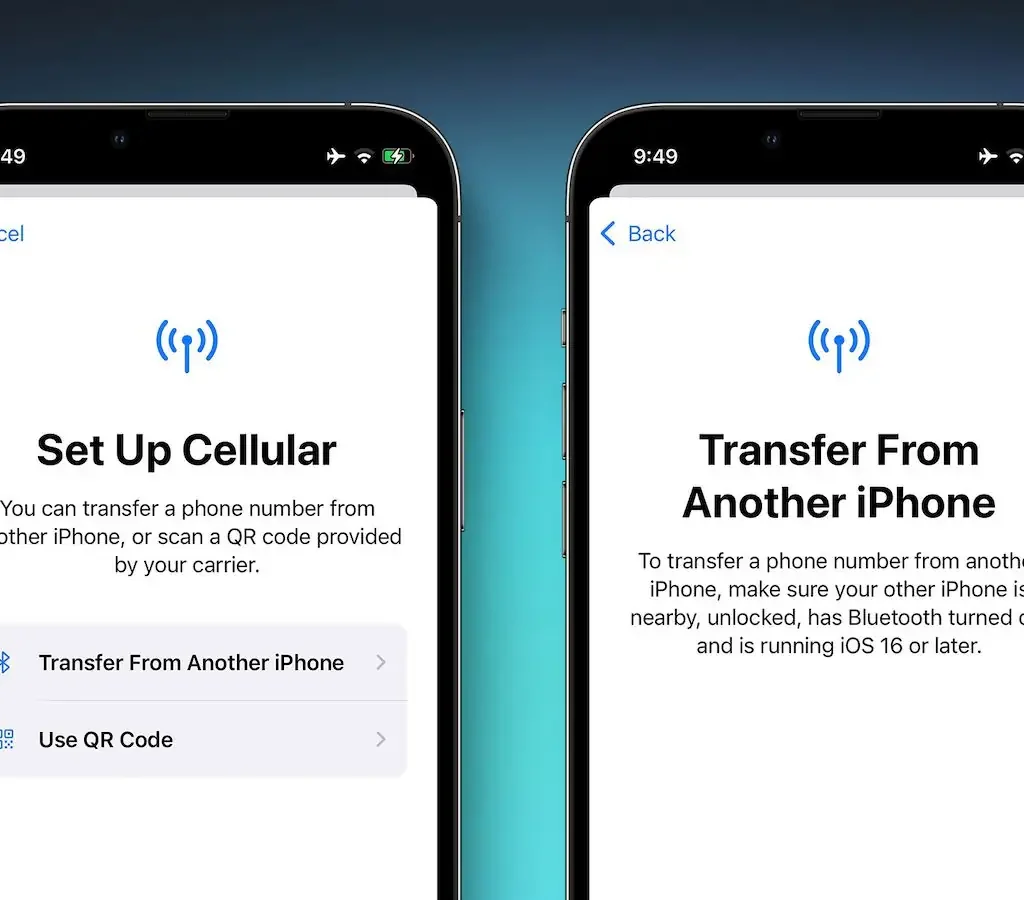
When both handsets meet the hardware prerequisites—meaning an iPhone XS, iPhone XR, or newer—the wireless handoff happens automatically. You can trigger this migration during the initial Quick Start setup screen or manually inside the system settings afterward.
First, unlock your previous device and keep its screen awake next to your new handset. Next, open the Settings app on your new iPhone, tap Cellular (or Mobile Service), and select Add eSIM. Choose Transfer From Nearby iPhone, which immediately triggers a verification prompt on your older screen.
Tap Transfer on the source device and enter the 6-digit verification code displayed on your new screen. Within 30 to 60 seconds, your new handset downloads the encrypted profile from your carrier’s SM-DP+ server. Simultaneously, the cellular signal on your old iPhone permanently deactivates to prevent duplicate line cloning.
iOS 26 and iOS 27 Multi-Line and Cross-Platform Breakthroughs
Apple finally eliminated one of the most annoying dual-SIM bottlenecks with the rollout of iOS 26 and iOS 27. Previously, users juggling separate work and personal lines had to migrate each digital profile individually. Now, the native transfer utility detects all active profiles and migrates multiple phone numbers in a single authenticated batch.
Even more importantly, native cross-platform eSIM migration between Android 16 and iOS 26 is now live across over 20 global carriers. Users switching from flagship Android hardware can simply scan a native QR code generated inside the iPhone setup menu. Major operators including AT&T, T-Mobile, Verizon, EE, Vodafone, and Telekom support this instant cross-OS handoff without third-party apps.
eSIM Migration Methods Compared: Speed, Security, and Cost
| Migration Method | Average Transfer Time | Carrier Fee / Cost | Internet Required | Multi-Line Support |
|---|---|---|---|---|
| eSIM Quick Transfer | 30–60 Seconds | $0 (₹0 / €0 / £0) | Mandatory Wi-Fi | Yes (iOS 26+) |
| Carrier App Provisioning | 2–5 Minutes | $0 (₹0 / €0 / £0) | Mandatory Wi-Fi | Single Line Only |
| Manual QR Code / SM-DP+ | 3–10 Minutes | $0–$10 (approx. ₹0–₹840 / €0–€9 / £0–£8) | Mandatory Wi-Fi | Single Line Only |
| Retail Store Replacement | 30–60 Minutes | $10–$35 (approx. ₹840–₹2,940 / €9–€32 / £8–£28) | Store Terminal | Manual Staff Entry |
Troubleshooting Stubborn Carrier Locks and Activation Errors
Despite Apple’s seamless engineering, regional Mobile Virtual Network Operators (MVNOs) still enforce strict backend security blocks. If your wireless migration stalls on the “Activating” screen, your carrier likely blocks peer-to-peer EID reassignment. Furthermore, attempting to transfer a plan onto a carrier-locked handset triggers an immediate server rejection.
To bypass a stalled migration, first verify that your new device is connected to an unrestricted Wi-Fi network rather than a captive hotel portal. If the prompt still fails, open your carrier’s official mobile application—such as myAT&T or My Verizon—and trigger a manual IMEI/EID swap. As a last resort, dial *#06# on your new keypad to copy your 32-digit EID and request a fresh one-time SM-DP+ activation code from support.
The Bigger Picture
Apple’s aggressive push toward eSIM-only hardware—starting with US models and expanding across flagship lineups—forced sluggish global telecoms to modernize outdated provisioning systems. By baking cross-platform Android-to-iOS transfers directly into the OS, Apple and Google have effectively stripped carriers of their last major switching friction. Telecom operators can no longer rely on physical SIM lock-in or store visit fees to retain frustrated subscribers.
Unfiltered Opinion
Learning how to transfer eSIM between iPhones properly is no longer optional tech trivia—it is essential digital hygiene. Apple’s Quick Transfer tool is genuinely brilliant when your old phone works, turning a dreaded afternoon errand into a painless 45-second tap. However, the industry still lacks a universal, foolproof recovery protocol when a primary phone is lost, stolen, or completely dead. Until every global carrier adopts instant cloud-based identity recovery without legacy SMS dependencies, always keep an active backup authentication method on file before upgrading.
- K.K., Founder of TechKomo