Unlocking the best iPhone Dynamic Island features will instantly change how you use your smartphone every single day.
- Master two-way swipe gestures to dismiss or instantly recover active Live Activities without canceling background tasks.
- Run dual simultaneous background apps with interactive split-bubble toggles across audio, timers, and GPS navigation.
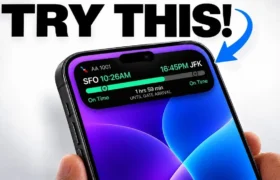
- Track real-time AirDrop file transfers, flight paths, and micro-privacy indicators right at the top of your screen.
- Use third-party interactive utilities to turn the display cutout into a retro gaming sandbox or battery gauge.
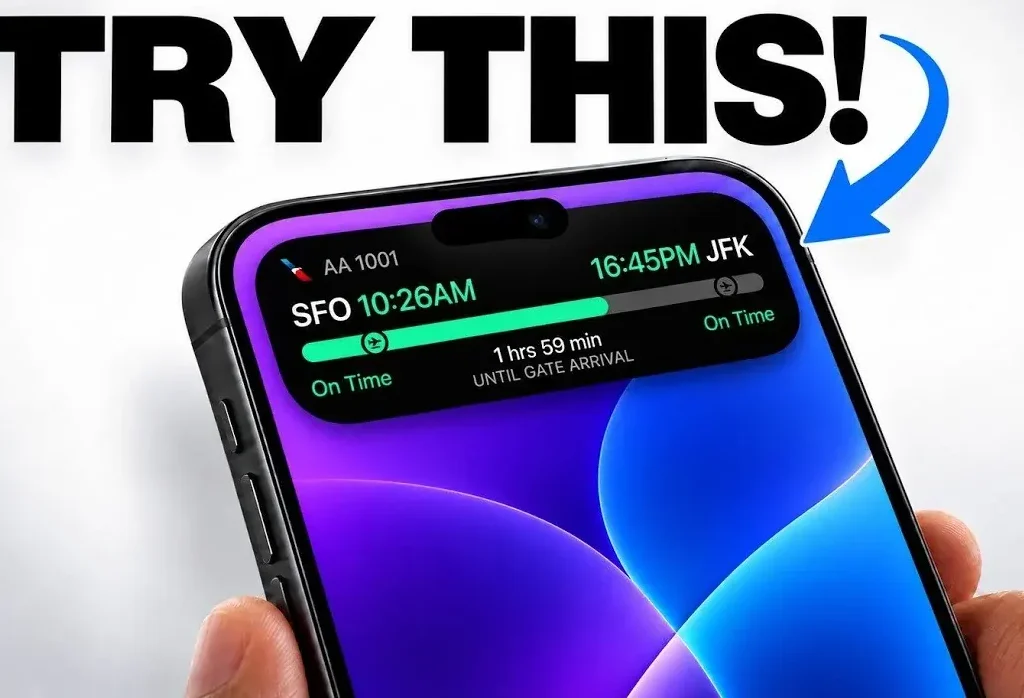
Are you actually maximizing the pill-shaped screen cutout on your phone, or are you treating it like dead pixels?
Apple turned a physical screen cutout into an active interface component through fluid hardware and software integration.
Instead of hiding the sensor array, iOS morphs the pixels around the cameras to display persistent alerts and interactive controls.
The Power of Gestures: Swiping Away and Restoring Alerts
Most users believe whatever appears inside the pill cutout is permanently locked to the top of the display.
However, swiping horizontally across the pill will immediately minimize any ongoing Live Activity without shutting it down.
If you swipe across an active music player, the visualizer collapses into the black background instantly.
Consequently, swiping back in the opposite direction brings that hidden graphic right back into view.
A quick single tap instantly jumps you straight into the host application.
Meanwhile, pressing and holding the pill surfaces an expanded widget with full audio scrubbers and playback controls.
Therefore, you bypass the need to visit the Control Center or switch apps entirely.
Mastering Split Multitasking with Dual Bubbles
Your device can manage two distinct background tasks at the same time without breaking a sweat.
When you run a workout timer alongside an active podcast, the interface splits into two visible components.
Specifically, the primary app anchors inside the larger pill shape, while the secondary alert pops into a detached circular bubble.
Tapping either separate element gives you independent control over that respective app without interference.
Furthermore, tracking rideshares and flight gates happens seamlessly while you browse social media feeds.
This dynamic split eliminates continuous app-switching and saves critical seconds throughout your work routine.
Native Sensors, AirDrop, and Stealth Utility Hacks
The interface acts as a real-time monitor for hardware security and local data transfer processes.
During large file transfers via AirDrop, a circular progress ring wraps around the camera cutout.
Once the transfer finishes, a bright confirmation icon appears so you never have to guess if files arrived.
Similarly, Face ID authentication shifts directly into the pill when authorizing wallet purchases.
Microphone and camera access triggers dedicated orange and green privacy dots embedded inside the hardware notch.
Additionally, pairing accessories reveals instant charging status and connection alerts at eye level.
Supported Capabilities and Core Hardware Overview
| System Feature | Interface Behavior | Core Interaction | Primary Utility |
|---|---|---|---|
| Media Playback | Waveform visualizer & album art | Long-press to expand scrubbers | Audio control without switching apps |
| Turn-by-Turn GPS | Direction arrows & distance metrics | Tap to switch to full navigation | Real-time transit directions |
| AirDrop Transfers | Circular percentage status ring | Automatic visual feedback | Track active large file syncs |
| Dual App Stacking | Main pill + detached satellite bubble | Tap individual bubble to launch | True simultaneous multitasking |
| Face ID & Apple Pay | Morphing green smiley authentication | Double-click side button to trigger | Secure frictionless checkout |
| Hardware Privacy | Green / orange dot indicator lights | Passive real-time visual alert | Unmask camera and mic usage |
Third-Party Magic: Pixel Pets and Mini Games
Developers have built creative utilities that turn the cutout into an interactive companion.
For instance, apps like Apollo and Pixel Pals allow you to place a tiny digital cat or dog right atop the island.
The pixelated animal sleeps, walks, and plays directly on top of the black sensor housing.
Moreover, games like “Hit the Island” transform the camera cutout into an active paddle-ball obstacle.
Other developer tools display real-time network speed monitors and live sports score tickers.
These clever integrations prove the hardware gap can provide delightful entertainment alongside serious productivity.
The Bigger Picture
Apple’s design approach forced the entire smartphone industry to rethink how front-facing camera cutouts function. Android competitors quickly scrambled to develop dynamic notification software skins to mimic this exact behavior. By turning an awkward physical display hole into an intuitive multitasking bridge, Apple established a software standard that keeps users glued to their ecosystem.
Unfiltered Opinion
Most people still dismiss the display pill as an overhyped marketing stunt designed to disguise camera cutouts. That cynicism is completely misplaced once you memorize the swipe-to-dismiss gesture and master dual-tasking. It is not perfect, especially when third-party app developers neglect updating their Live Activity widgets. However, skipping these built-in shortcuts leaves genuine speed and daily productivity on the table. Take five minutes to learn the gestures, and you will never view the top of your display the same way again.
- K.K., Founder of TechKomo