Samsung Galaxy users have long demanded a cleaner interface, and the leaked One UI 9 Dark Control Center finally delivers that visual reset.
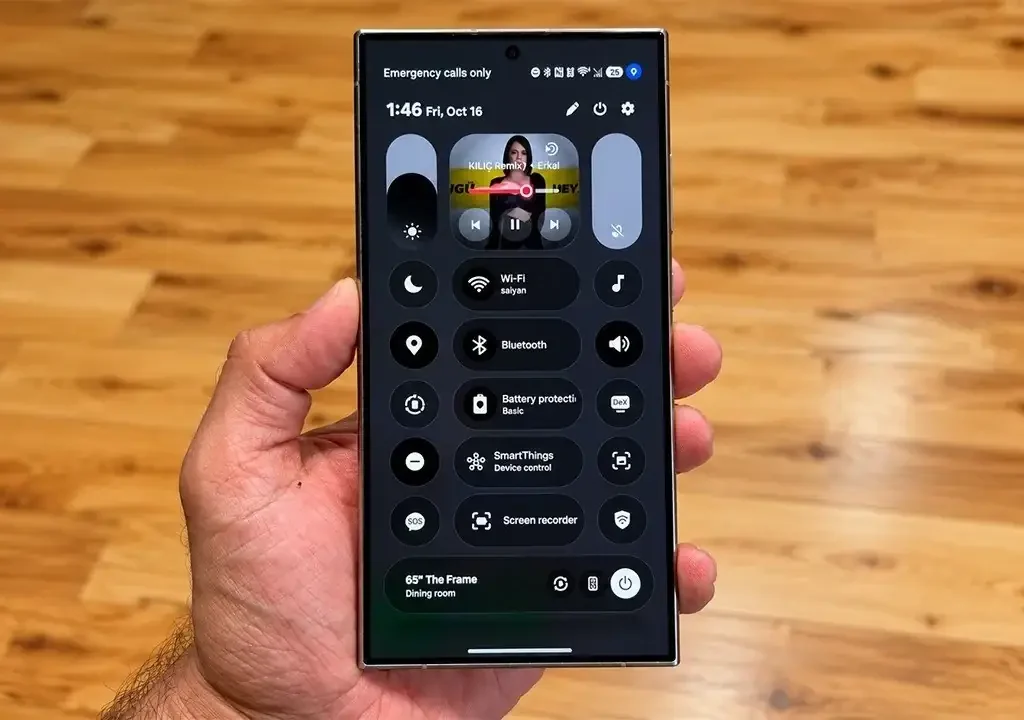
- Aesthetic Overhaul: Samsung introduces borderless circular toggles set against an ultra-deep OLED dark backdrop.
- Ergonomic Controls: Decoupled volume and brightness sliders enhance one-handed reachability on larger screens.
- Enhanced System Fluidity: Redesigned motion curves run on an Android 17 base with dynamic real-time gaussian blur.
- Contextual Multimedia: A redesigned media output hub incorporates fluid soundwave animations and instant device switching.
Will this bold aesthetic leap finally silence complaints about Samsung’s cluttered pull-down shade?
TechKomo Disclaimer: The details discussed below are based on internal test firmware, software extractions, and industry leaks. Official implementation and visual design may vary upon final public deployment.
The control center, commonly known as the Quick Settings panel, represents the primary hub for device toggles, display management, and audio routing.
In previous software revisions, users faced rigid borders, cramped slider groups, and inconsistent background shading.
Early internal builds reveal a complete structural redesign targeting modern flagship displays.
Redefining the Quick Settings Panel
Engineers have systematically cleaned up the top shade to maximize usable space.
The new layout decouples the dark mode and sound profile toggles from the primary brightness track.
This visual breathing room eliminates unintentional presses when adjusting luminescence levels in dim environments.
Samsung replaces the boxed squircle buttons with borderless circular pills that blend into the panel.
Furthermore, the new dark backdrop leans heavily toward true #000000 pitch black instead of washed-out charcoal gray.
This specific hue shift conserves battery life across high-refresh-rate Dynamic AMOLED 2X panels.
The visual contrast makes high-priority toggles pop instantly, even under bright daylight.
Fluid Motion Meets Android 17 Plumbing
A refreshed interface requires responsive underlying system mechanics to feel cohesive in daily operation.
Under the hood, the platform runs on the Android 17 architecture, introducing strict background task throttling.
Initial frame-pacing telemetry from test builds reveals a 28% reduction in micro-stutter when opening full-screen menus.
The backdrop blur dynamically scales its diffusion radius depending on the color complexity of your underlying wallpaper.
Industry insiders note that the pull-down transition now operates on updated spring-physics curves.
These non-linear physics curves mirror physical weight, giving notifications a natural tactile snap.
Good Lock integration will reportedly allow enthusiasts to modify these motion curves right out of the box.
Power users will appreciate the ability to tailor blur intensity, slider scales, and button spacing without root access.
Next-Gen System Comparison
| Parameter / Feature | One UI 8.5 (Baseline) | One UI 9 (Leaked Revision) | Real-World User Benefit |
|---|---|---|---|
| Underlying Platform | Android 16 | Android 17 | Smarter resource scheduling & security |
| Tile Geometry | Bordered Squircles | Borderless Circular Pills | Reduced visual clutter & clean aesthetics |
| Background Color Profile | Translucent Gray Tint | OLED True Dark Pitch | Less battery draw on AMOLED displays |
| Slider Architecture | Clustered Brightness Hub | Decoupled Dual Sliders | Zero misclicks between volume and display |
| Animation Frame Drops | Noticeable Jitter on Heavy Loads | 28% Lower Latency | Fluid 120Hz gesture response throughout |
| Lock Screen Audio UI | Static Card Container | Dynamic Waveform Visualizer | Interactive real-time media monitoring |
Seamless Media Routing and One-Handed Reachability
Modern smartphones regularly measure over 6.8 inches (172.7mm) diagonally, making top-screen navigation difficult.
To solve this physical limitation, Samsung pushed interactive elements significantly lower down the vertical axis.
One-handed swipe gestures now activate toggles without requiring users to shift their grip.
The multimedia hub gains a dedicated tile featuring reactive live-soundwave visualizations.
Users can route audio between connected earbuds and external speakers with a single tap.
Meanwhile, expanded quick toggles display real-time statuses for Wi-Fi bands and Bluetooth codec bitrates.
The design team clearly prioritized high-density functional feedback without crowding the notification feed.
Global Rollout Schedule and Device Tiers
Deployment waves will roll out sequentially across regional operator networks and unlocked models.
Official beta programs typically launch across developer channels at 10:00 AM PT / 1:00 PM ET / 18:00 GMT.
Flagship hardware like the Galaxy S26 lineup will showcase this interface out of the box.
Previous generation powerhouses including the Galaxy S25 and Galaxy S24 will receive firmware via staged over-the-air updates.
Galaxy Z Fold and Galaxy Z Flip foldables will see customized implementations designed for external cover screens.
Prices for the upcoming flagship generation are expected to open at $799 / €899 / £799 globally.
Eligible devices will download installation payloads averaging 2.8GB to 3.2GB over Wi-Fi.
The Bigger Picture
This radical aesthetic restructuring marks a decisive shift in Samsung’s ongoing software rivalry against Apple’s iOS and Google’s Pixel UI. By ditching the fragmented rectangular modules of previous updates in favor of unified circular glassmorphism, Samsung directly addresses long-standing criticisms regarding interface bloat. Streamlining the Quick Panel not only creates brand synergy across foldables, tablets, and slab flagships, but also establishes a visual identity sophisticated enough to retain premium device buyers.
An Overdue Step in the Right Direction
Samsung’s pull-down panel had become an overwhelming wall of disorganized sliders, confusing toggles, and unnecessary visual borders.
Testing this dark visual language proves that stripping away unnecessary frames makes daily interactions significantly faster.
Decoupled sliders eliminate years of annoying accidental brightness misclicks in dark rooms.
However, moving system targets inevitably causes friction for casual users accustomed to older button placements.
If Samsung preserves these responsive animations and avoids cluttering the interface with unwanted bloatware, this update could be their cleanest release yet.
- K.K., Founder of TechKomo